Save your tabs.Restore them instantly.
HorusTabs captures your entire browser session: every window, every tab, every state. Restore it with one click. Sync across devices for free. Never lose your workflow again.
- Free forever
- One-click restore
- Cloud sync included
See it in action
Save. Close. Restore. That's it.
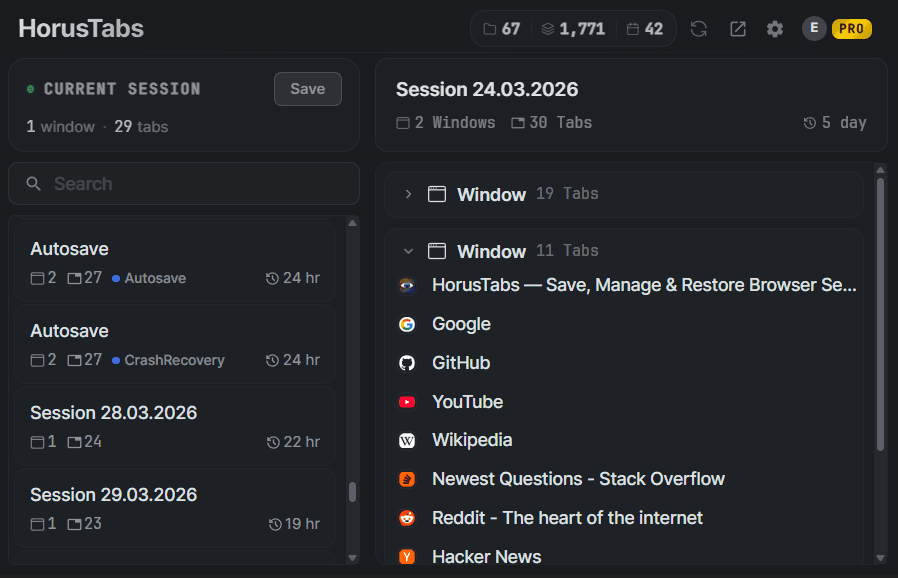
Save your entire session in one click. Restore it anytime.
Features
Everything you need.Nothing you don't.
HorusTabs is built for power users who value their browsing workflow. Every feature is designed to be fast, intuitive, and non-intrusive.
Save & Restore Sessions
Capture your entire browsing state: all windows, tabs, and positions. Restore everything with a single click.
Auto-Save & Crash Recovery
Automatic session snapshots at configurable intervals. Your sessions survive crashes and unexpected shutdowns.
Tags & Organization
Color-coded tags, favorites, archives, and notes. Find any session instantly with search and filters.
Your Data, Protected
Sessions are stored locally on your device by default. Cloud sync uses encrypted storage. Deleted sessions go to trash for easy recovery.
Import & Export
Export sessions as JSON, CSV, or compressed format. Import from backups or share sessions between devices.
Cloud Sync
Sync sessions across all your devices automatically. Your workspace follows you everywhere.
Data Safety
Your data stays yours.
We built HorusTabs with a local-first philosophy. Your sessions are stored in your browser's own database, not on our servers, not in the cloud, not anywhere you didn't choose.
If you enable cloud sync, your data is encrypted in transit and at rest, stored on secure, SOC 2 compliant infrastructure. You can export everything at any time as JSON, CSV, or compressed. You're never locked in.
Local-first storage
Your sessions live in your browser's local database. Nothing is sent anywhere unless you enable cloud sync.
Encrypted cloud sync
Synced data is encrypted in transit (TLS) and at rest, and access is locked to your account by row-level security.
Auto-save & crash recovery
Automatic snapshots on a schedule mean your tabs survive crashes, updates, and accidental closes.
Trash bin with recovery
Deleted sessions go to trash first, with a countdown and a reminder before they're gone. Restore anytime within your retention period: 30 days by default, adjustable from 3 to 90.
How it works
Simple by design.
Install the extension
Add HorusTabs to Chrome in one click from the Chrome Web Store. No account needed, it works immediately.
Save your sessions
Click the HorusTabs icon or press Ctrl+Shift+S to save your current windows and tabs. Name it, tag it, done.
Restore anytime
Browse your saved sessions and restore any of them with one click. All windows and tabs come back exactly as they were.
Sync across devices (optional)
Sign in with a free account to sync your sessions across all your devices. Your workspace follows you everywhere.
Pricing
Free forever.Everything included. Donations welcome.
No subscriptions, no card, no paywall. Cloud sync included. If HorusTabs saves you time, a one-time donation keeps the servers running and makes you Pro ❤️ forever, with 4× the sync storage.
- Unlimited sessions
- Save & restore windows/tabs
- Cloud sync across devices
- Auto-save & crash recovery
- Tags, notes & search
- Trash bin & session recovery
- Import & export (JSON, CSV)
- Scheduled backups
- Keyboard shortcuts
- 10+ languages
Cloud sync: up to 1,000 sessions / 5 MB per account, plenty for years of everyday use.
- Everything in Free (already yours)
- Pro ❤️ badge on your account
- 4× cloud sync: 3,000 sessions / 20 MB
- Keeps the servers running
- Priority support
Ko-fi activates Pro automatically (use your account email). Paid with crypto? Sign in and claim Pro with your transaction hash.
FAQ
Got questions?We have answers.
HorusTabs is a Chrome extension that lets you save your entire browsing session (every window, every tab, every position) and restore it with a single click. It's built for power users who value their workflow.
Yes, 100% free, including cloud sync. Unlimited local sessions, auto-save, crash recovery, tags, search, trash bin, import/export, and sync across your devices with a free account. There's no subscription and nothing is paywalled. Donations are welcome but entirely optional.
Visit the Chrome Web Store, search for HorusTabs, and click "Add to Chrome". The extension works instantly, no account required for the free tier.
Currently, HorusTabs is available exclusively for Google Chrome. Support for other Chromium-based browsers (Edge, Brave, Opera) is planned for future releases.
Absolutely. Your sessions are stored locally on your device by default. Nothing leaves your browser unless you choose to enable cloud sync. Synced data is encrypted in transit and at rest on secure, SOC 2 compliant infrastructure. Deleted sessions go to a recoverable trash bin - kept for 30 days by default (adjustable 3–90), with a visible countdown and a reminder before anything is permanently removed - so you never lose data by accident.
Pro ❤️ forever, for any amount: a Pro badge on your account, 4× the cloud sync storage (3,000 sessions / 20 MB), and priority support, plus you keep the servers running. Nothing else is paywalled; every feature including cloud sync is free for everyone. Donate via Ko-fi (using your account email) and Pro activates automatically. Paid with crypto (BTC, ETH, USDT, SOL)? Sign in and use "Claim your Pro" with your transaction hash.
To keep the free service sustainable, each account can sync up to 1,000 sessions or 5 MB of compressed data (Pro: 3,000 sessions / 20 MB), enough for years of everyday use (a typical session is a few kilobytes). Local storage on your device is unlimited.