// Session Management, Reimagined
Save your tabs.Restore them instantly.
HorusTabs captures your entire browser session — every window, every tab, every state. Restore it with one click. Sync across devices with Pro. Never lose your workflow again.
// See it in action
Save. Close. Restore. That's it.
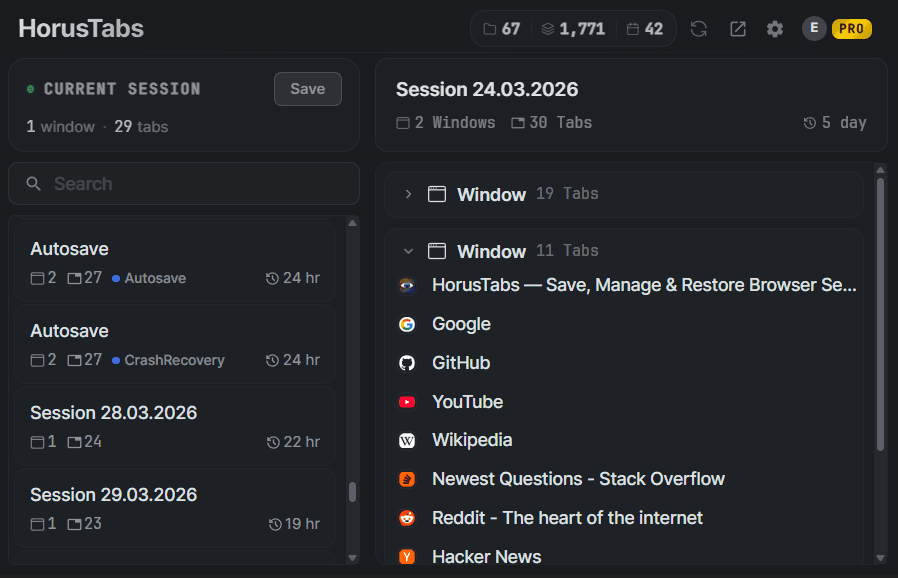
Save your entire session in one click. Restore it anytime.
// Features
Everything you need.Nothing you don't.
HorusTabs is built for power users who value their browsing workflow. Every feature is designed to be fast, intuitive, and non-intrusive.
Save & Restore Sessions
Capture your entire browsing state — all windows, tabs, and positions. Restore everything with a single click.
Auto-Save & Crash Recovery
Automatic session snapshots at configurable intervals. Your sessions survive crashes and unexpected shutdowns.
Tags & Organization
Color-coded tags, favorites, archives, and notes. Find any session instantly with search and filters.
Your Data, Protected
Sessions are stored locally on your device by default. Cloud sync uses encrypted storage. Deleted sessions go to trash for easy recovery.
Import & Export
Export sessions as JSON, CSV, or compressed format. Import from backups or share sessions between devices.
Cloud Sync
Sync sessions across all your devices automatically. Your workspace follows you everywhere.
// Data Safety
Your data stays yours.
We built HorusTabs with a local-first philosophy. Your sessions are stored in your browser's own database — not on our servers, not in the cloud, not anywhere you didn't choose.
If you enable Pro cloud sync, your data is encrypted end-to-end and stored on secure, SOC 2 compliant infrastructure. You can export everything at any time — JSON, CSV, or compressed. You're never locked in.
Local-first storage
Your sessions live in your browser's local database. Nothing is sent anywhere unless you enable cloud sync.
Encrypted cloud sync
Pro sync uses end-to-end encrypted infrastructure. Your data is protected in transit and at rest — only you can access it.
Auto-save & crash recovery
Automatic snapshots on a schedule mean your tabs survive crashes, updates, and accidental closes.
Trash bin with recovery
Deleted sessions go to trash first. Restore them anytime within your chosen retention period — 3 to 90 days.
// How it works
Simple by design.
Install the extension
Add HorusTabs to Chrome in one click from the Chrome Web Store. No account needed — it works immediately.
Save your sessions
Click the HorusTabs icon or press Ctrl+Shift+S to save your current windows and tabs. Name it, tag it, done.
Restore anytime
Browse your saved sessions and restore any of them with one click. All windows and tabs come back exactly as they were.
Sync with Pro (optional)
Upgrade to Pro to sync your sessions across all your devices. Your workspace follows you everywhere.
// Pricing
Start free.Upgrade when you need sync.
- Unlimited sessions
- Save & restore windows/tabs
- Auto-save & crash recovery
- Tags, notes & search
- Trash bin & session recovery
- Import & export (JSON, CSV)
- Scheduled backups
- Keyboard shortcuts
- 10+ languages
- Everything in Free
- Cloud sync across devices
- Automatic cloud backups
- Priority support
- Early access to new features
// FAQ
Got questions?We have answers.
HorusTabs is a Chrome extension that lets you save your entire browsing session — every window, every tab, every position — and restore it with a single click. It's built for power users who value their workflow.
Yes! HorusTabs is 100% free with unlimited sessions, auto-save, crash recovery, tags, search, trash bin, import/export, and more. The optional Pro plan ($1.49/month) adds cloud sync across devices and automatic cloud backups.
Visit the Chrome Web Store, search for HorusTabs, and click "Add to Chrome". The extension works instantly — no account required for the free tier.
Currently, HorusTabs is available exclusively for Google Chrome. Support for other Chromium-based browsers (Edge, Brave, Opera) is planned for future releases.
Absolutely. Your sessions are stored locally on your device by default — nothing leaves your browser unless you choose to enable cloud sync. Pro tier data is encrypted end-to-end and synced via secure, SOC 2 compliant infrastructure. Deleted sessions go to a recoverable trash bin before permanent removal, so you never lose data by accident.
Pro adds cloud sync across all your devices, automatic cloud backups, priority support, and early access to new features — all for $1.49/month or $0.99/month billed annually.